Configuring streaming replication
Configuring a replication scenario can be complex. For detailed information about configuration options, see the PostgreSQL core documentation.
You might want to use a .pgpass file to enable md5 authentication for the replication user. This might not be the safest authentication method for your environment. For more information about the supported authentication options, see the PostgreSQL core documentation.
Note
Failover Manager uses pg_ctl utility for standby promotion. You don't need to set the trigger_file or promote_trigger_file parameter for promotion of a standby server.
Limited support for cascading replication
Failover Manager provides limited support for simple failover in a cascading replication scenario. Cascading replication allows a standby node to stream to another standby node, reducing the number of connections (and processing overhead) to the primary node.
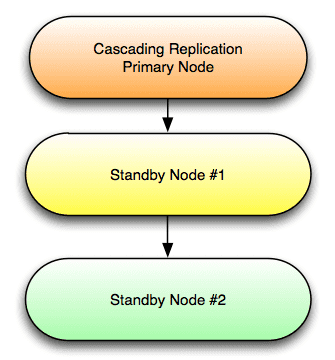
For detailed information about configuring cascading replication, see the PostgreSQL documentation.
To use Failover Manager in a cascading replication scenario, modify the cluster properties file, setting the following property values on standby node #2:
promotable=false
auto.reconfigure=false
In the event of a failover, standby node #1 is promoted to the role of primary node. Standby node #2 continues to act as a read-only replica for the new primary node until you take actions to manually reconfigure the replication scenario to contain three nodes.
In the event of a failure of standby node #1, you won't have failover protection, but you'll receive an email notifying you of the failure of the node.
Note
If using physical replication slots, the situation is more complicated. If standby node #2 in the diagram above is using a physical replication slot, and standby node #1 is promoted to primary, the new primary agent (if configured) will copy replication slots to any other promotable database nodes in the cluster. If a standby is then promoted, it will not advance the slot name that is set on standby node #2 or signal other standby agents to advance the slot. Care must be taken to either not promote standby node #1 (provide other standbys and mark #1 as also non-promotable), take steps to limit the amount of wal that is kept by using the Postgresql max_slot_wal_keep_size setting, or manually drop the inactive slot on other database nodes. Dropping this slot could be accomplished using the script.post.promotion and script.remote.post.promotion properties. It is recommended to avoid using cascading replication with physical replication slots and Failover Manager.
- On this page
- Limited support for cascading replication