Overview
Role: CTO / Architect / Lead Engineer
Prerequisites
- A list of the business goals that your architecture plan should enable (examples: bugdet constraints, desired uptime, and desired latency)
Outcomes
An Architectural Decision Record (ADR) defining the topology, locality, and redundancy model of your Hybrid Manager (HM) architecture. (at minimum: architecture diagrams with notes)
Initial inputs for the HM configuration — a
HybridControlPlaneCustom Resource manifest.
Note
You, as the customer, ultimately own your deployment architecture. While EDB's Sales Engineering, Professional Services, Support Team, or documentation can be consulted, the final architectural decisions rest with your team.
Next phase: Phase 2: Gathering your system requirements
Architectural discovery
The goal of architectural discovery is to navigate and then document the necessary decisions to successfully deploy Hybrid Manager (HM). These decisions form the blueprint for Gathering your system requirements (Phase 2) and Preparing your environment (Phase 3).
The accompanying questions cover a broad set of considerations extending beyond just the database layer. This guide should be viewed from two perspectives:
Current state: Where are your existing database and application workloads today?
Target state: Where do you intend to deploy HM immediately, and where do you plan to expand over the next 1-2 years?
Recommendation: Acquiring and reviewing diagrams of your current and target state is the most efficient way to complete this phase.
Locality: Where will HM live?
Understanding the physical or logical locations of your database and dependent applications is crucial for determining the necessary architecture.
Questions to answer:
Where is the current database solution located in terms of cloud regions (CSP) or physical data centers (on-premises)?
Where are the dependent application workloads for these databases located?
Are there upstream layers of dependency, and where are those located?
Analysis:
- Locality determines the initial scope of the deployment (for example, single cloud region vs. multi-region).
- If you plan to span multiple regions, clouds, or hybrid cloud environments, Postgres Distributed is likely the appropriate database service recommendation.
- The locality of upstream applications is key to minimizing network latency.
Disaster recovery (hot/cold)
Disaster recovery (DR) ensures business continuity across different locations.
Questions to answer:
- How is disaster recovery—as a subset of business continuity—accomplished across these locations, or is there an additional location assigned specifically as disaster recovery?
- Is there an additional location assigned specifically as DR?
- How is DR capability validated, and how often?
Analysis:
- Having a dedicated secondary location indicates a strong architectural requirement.
- If no formal DR practice exists, the HM DBaaS far-away replica solution may provide new capabilities.
Activeness (Active/Passive vs. Active/Active)
Activeness describes how your distributed locations are utilized for critical workloads.
Questions to answer:
- If you have multiple locations, how does the critical dependent workload utilize these systems?
- Is one location active and the other passive for transaction processing (OLTP)?
- Is one location active for OLTP, and the other active for analytical processing (OLAP/BI)?
Analysis:
- If your target state requires simultaneous writes to multiple database instances (that is, true active/active across locations), Postgres Distributed is the required solution due to its multi-writer capability..
- Understanding whether a location is passively waiting (cold standby) or actively running (hot standby) helps define resource requirements and recovery time objectives (RTO).
- Business continuity: The architectural choices around active/passive, active/active, and standby models must balance the organization's tolerance for downtime/data loss against the cost of maintaining redundant systems.
These topics naturally follow the discussion of Activeness and help complete the picture of your application ecosystem.
- Ingress traffic routing in terms of the consuming application.
- Replication at various application layers.
- Caching layers (and their location relative to the database).
- Session demands (for example, is session replication handled at the application layer?).
Lifecycle operations
Understanding your operations practices helps determine the complexity of the Kubernetes environment required to manage the database service.
Questions to answer:
- Do you utilize life cycle operations patterns such as Blue/Green or Canary?
- How do you handle DML/DDL updates (data and schema) vs. engine upgrades (major versions)?
- What pre-production environments (staging, development, testing) are required?
Analysis:
- Practices like Blue/Green deployment align well with the zero-downtime features offered by EDB's database solutions.
- The number of pre-production environments directly influences the total cluster count and resource sizing defined in Gathering your system requirements.
Supported platforms
HM and Kubernetes have a 1:1 relationship: you can't run more than one HM deployment on the same Kubernetes cluster.
A dedicated Kubernetes cluster isn't required, but it's recommended, especially while you're gaining initial experience with HM. HM can coexist with other Kubernetes workloads. Istio is the most common point of conflict, and while conflicts are manageable, they require more integration effort.
- Amazon EKS (Elastic Kubernetes Service)
- Microsoft Azure AKS (Azure Kubernetes Service)
- Google GKE (Google Kubernetes Engine)
- ROSA (Red Hat OpenShift Service on AWS)
- Red Hat OpenShift (RHOS)
- SUSE Rancher RKE2 (Rancher Kubernetes Engine)
For a more detailed overview of HM compatibility per LTS/IR version, see Hybrid Manager platform compatibility.
Note
The customer is responsible for the full life cycle management of the Kubernetes cluster: provisioning, deploying, upgrading, and scaling.
HM distributed reference architecture
The HM distributed reference architecture represents the ultimate goal for achieving the highest levels of scale and fastest SLAs. It typically spans multiple data centers.

Diagram legend reference
The legend defines the colors and logical groupings used in the architecture diagram:
- Locality: The highest-level physical or logical grouping, such as a physical data center or a geographical region (for example, "City 1" and "Data Center 1").
- Kubernetes Cluster: The complete Kubernetes environment—including all CP and worker nodes—hosting the entire platform.
- EDB HM: The logical boundary for the core HM components. This is typically implemented as a dedicated Kubernetes namespace (for example, control-plane).
- Compute Machine: The virtual machines (for example, vm01, vm02, vm03) that serve as the Kubernetes worker nodes, providing the CPU, memory, and storage for the cluster.
- Infrastructure Abstraction: This critical layer represents Kubernetes-native resources that abstract underlying physical or virtual infrastructure. These resources must be provided by the Kubernetes cluster's environment.
- Example 1: type: LoadBalancer: This is a Kubernetes Service type that requests an external load balancer. In public cloud environments (like AWS, GCP, Azure), this is automatically provisioned as a managed service. In on-premises or bare-metal deployments, you must provide a solution (like MetalLB) to fulfill these LoadBalancer requests.
- Example 2: StorageClass: This resource abstracts the "Block Storage" and "Object Storage" requirements. It maps Kubernetes storage requests (Persistent Volume Claims) to actual, provisioned storage hardware or software (like local-pv, Ceph, vSphere, or cloud-based disks).
HM Control Plane vs. Data Plane
| Attribute | Control Plane (CP) | Data Plane (DP) |
|---|---|---|
| Role | Orchestration, configuration, and observability | Postgres cluster hosting and replication |
| Protocol | HTTP (REST / gRPC) via Istio service mesh | Postgres wire protocol (TCP) per PG cluster |
| Multi-location topology & traffic | Star — Primary is mandatory hub across locations; Primary pushes Control outbound to each Secondary, Secondaries return Logs to Primary | Optional mesh — locations may be fully isolated or directly peered for Postgres replication; no hub required |
| Lifecycle isolation | All CPs share management context; CP upgrades affect the full estate | Each DP is an independent failure, security, and upgrade domain |
| DR role | Secondary CPs provide management continuity | DPs are the replication targets; hot/cold standby model determined per deployment |
| Scenarios | core, migration, ai, marketplace | dbaas, pgd, analytics, ai |
Protocol and ingress
The simplest way to distinguish the two planes is by protocol.
The Control Plane is entirely EDB product, and every component in it speaks HTTP. That HTTP traffic is served and secured by the Istio service mesh, which provides a single, centralized ingress surface across all CP services. Authentication, TLS, and traffic policy are all enforced at the Istio layer before a request reaches any CP component.
The Data Plane is customer-provisioned Postgres, and every cluster in it speaks the Postgres wire protocol (PSQL). There's no middleware in the path. Each Postgres cluster listens on its own dedicated TCP connection — there's no shared proxy or mesh aggregating these connections. This is a deliberate design choice: dedicated ingress per cluster maximizes both availability and the security isolation boundary between customer workloads.
In short: HTTP CP ingress is centralized via Istio; PSQL DP ingress is dedicated per Postgres cluster.
Lifecycle isolation
Lifecycle isolation is the most operationally significant distinction between the two planes.
The CP and every DP it manages are on independent upgrade lifecycles. We publish patches on a monthly cadence for the Long Term Support (LTS) release. Customers are strongly encouraged to apply these promptly, and the architecture makes this practical: upgrading the CP does not restart customer Postgres on the DP. Applications continue serving connections through the upgrade, and there's no maintenance window required for Postgres availability when the CP is patched. This separation holds because the embedded CloudNativePG (CNPG) operator that manages Postgres on the DP is configured for in-place instance-manager updates. When the operator is upgraded, the instance manager binary inside each Postgres pod is swapped while the running postmaster continues serving traffic. No pod restart, no switchover, no application-visible event.
These monthly CP patches carry two categories of content:
- CP component security patches — hardening the orchestration layer itself.
- New Postgres container images — updated images for Postgres engine versions, extensions, and the container host OS, all with current security patches applied.
Once new images are available in the CP, it's the customer's decision when to use the CP's orchestration capabilities to roll those images out to their DP Postgres deployments. This preserves full customer control over Postgres upgrade timing while ensuring that hardened images are always available on demand.
Exception to the rule
A small fraction of CNPG operator releases — historically well under 10% — change the Postgres Pod specification itself, for example modifications to anti-affinity rules, container probes, or init containers. In these releases, Kubernetes must recreate the pods to match the new spec, and a rolling restart of HA Postgres clusters is unavoidable as part of the CP upgrade, even with in-place instance-manager updates enabled. When an HM release embeds one of these CNPG versions, EDB calls this out explicitly in the HM upgrade documentation and in pre-upgrade guidance to affected customers. This means customers know in advance whether a given HM upgrade is fully non-disruptive or whether a rolling Postgres restart will occur as part of it — and can plan a maintenance window only when one is actually required.
Availability and disaster recovery
CP availability and DP availability are independent concerns, and the two planes warrant different recovery strategies.
Control Plane
The CP doesn't sit in the data path of customer Postgres traffic. A CP outage doesn't interrupt connections to provisioned Postgres clusters — running workloads continue unaffected. The CP has a robust DR capability: with disciplined operational practice (regular backups, documented runbooks), a CP can be restored in under one hour.
Data Plane
Because the DP carries live Postgres traffic, higher availability targets require active replication across failure domains — optimally across regions. Postgres replication across DP locations (where network peering is provisioned) allows the DP to survive a regional failure without any impact to application connectivity.
Availability zones
Both planes can take full advantage of availability zones within a location. Every HM deployment location may contain CP elements, DP elements, or both. Any location can be recovered from disaster using backups. The difference is ceiling: the CP's recovery is a restore operation measured in minutes to an hour, while the DP's Postgres clusters have the architectural capacity to remain continuously available through a disaster by maintaining live replicas in other failure domains.
Deployment architectures
Note
This legend above also applies to deployment architectures below.
Minimum Control Plane
The minimum install colocates the HM Control Plane (CP) on the Kubernetes control nodes.
This is fully functional for:
- Centralizing a view of your Postgres/Oracle Estate.
- Database migration capabilities.
- GenAI (limited capabilities due to lack of managed Postgres instances).

Internal architecture: HM Control Plane
HM is composed of several core microservices running within the Kubernetes cluster. Understanding these components is helpful for planning resource allocation and security boundaries.
- GenAI: Provides the AI/ML capabilities. If enabled, this component dictates the need for GPU-enabled worker nodes in your system requirements.
- See: GenAI in HM
- Postgres life cycle operations: The orchestration engine that manages deployment, scaling, and updates of the databases.
- See: Cluster Management
- Telemetry: Collects metrics and logs. This service requires outbound network access to report health status.
- See: Monitoring with HM
- Database Migration Assistant: Facilitates the movement of data from external sources into the platform.
- Estate: Manages the inventory of resources creating using the HM DBAAS internal system as well as external databases.
- Federation: Manages secure communication and authorization across multiple HM instances in a Multi-Location topology.
Architectural dependencies
The architecture diagrams above reference several external components. While you verify the specific hardware/software requirements for these in Phase 2: Gathering your system requirements, you must account for their connectivity in your architectural design.
- Identity provider (IdP): Required for user authentication. The architecture relies on OIDC (LDAP/SAML) for all human access.
- Key Management Service (KMS): (Optional) Required only if your security policy demands Transparent Data Encryption (TDE).
- Object Storage: Required for system resilience. It hosts backups, logs, and facilitates data replication for Multi-Location topologies.
- Block Storage: Required for database performance. Your storage architecture must provide persistent volumes (PVCs) for the Postgres data layer.
- Local network: The fabric connecting the CP to Data Plane. Latency here drives your Locality decisions.
- Container Registry: The source of truth for application images. For air-gapped designs, this represents your local synchronized registry.
HM Control Plane + Data Plane
Sitting alongside the HM CP is the HM Data Plane (DP). This is where your actual database workloads reside.
Postgres clusters: The actual database instances (Primary and Standbys).
Extensions: PostGIS, PGVector, and other database extensions.
Backup agents: Local tools (like Barman) managing WAL archiving to your Object Storage.

HM fully featured deployment
This view shows a fully capable HM deployment, including resources like GPU acceleration for AI workloads.

Multi-location topologies in EDB Hybrid Manager
EDB Hybrid Manager supports multi-location deployments through two distinct but complementary network topologies — one for the Control Plane and one for the Data Plane. Each topology reflects the role and protocol of its plane.
The multi-location capability is a DBaaS offering following a hub and spoke model.
- As a DBaaS offering, secondary HMs have a reduced capability set compared to the primary.
- The primary HM controls the Secondary.
- Connectivity is established using load-balanced endpoints; not a network mesh service like Submariner.

Control Plane: star topology
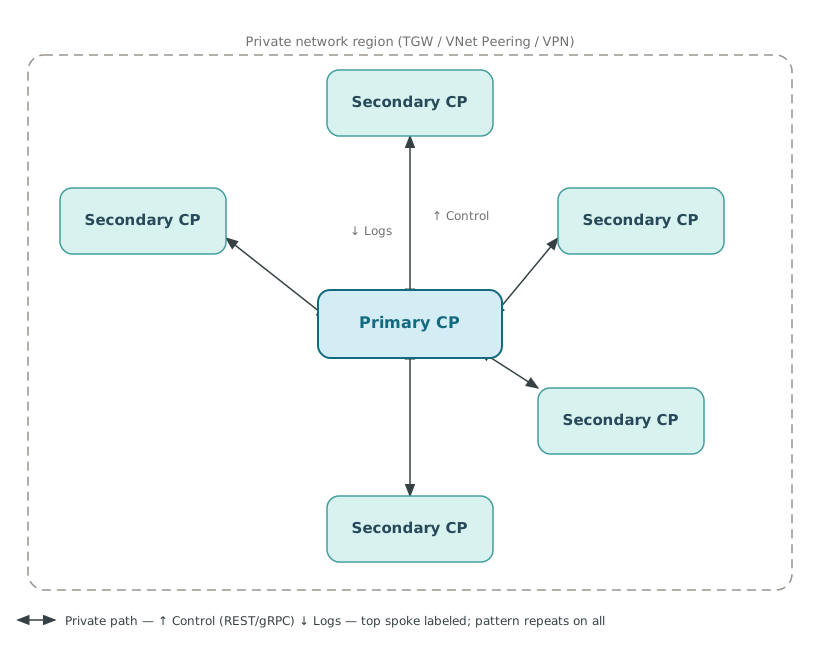
The Control Plane is arranged in a star topology: one designated Primary CP sits at the center and up to five Secondary CPs radiate outward from it.
Traffic follows a strict directional pattern. Control flows outward from the Primary to each Secondary — configuration, orchestration commands, and lifecycle operations all originate at the hub. Logs flow inward, returning from each Secondary back to the Primary. Secondaries have no lateral visibility: they can't control one another, and they can't self-govern. All authority is centralized in the Primary.
This hub-and-spoke authority model has an important consequence. Because each Secondary CP is managed by the Primary but is otherwise autonomous in terms of what workloads it hosts, any Secondary can serve an entirely different engagement. Common examples include:
- Dev/test vs. production — separate Secondaries enforce environment isolation at the infrastructure level
- One customer vs. another — multi-tenant or MSP deployments where workload separation is a contractual or security requirement
- On-premises vs. cloud — a single Primary can govern CPs deployed in a private data center alongside CPs deployed in one or more CSPs
- Geo-distributed regions — each Secondary can reside in a different geographic region, managed from a single operational center of gravity The star is connected exclusively over private network paths — internal LoadBalancer endpoints accessed via VPC/VNet peering, Transit Gateway, VPN, or equivalent. No Secondary is reachable over a public endpoint.
Data Plane: optional mesh topology
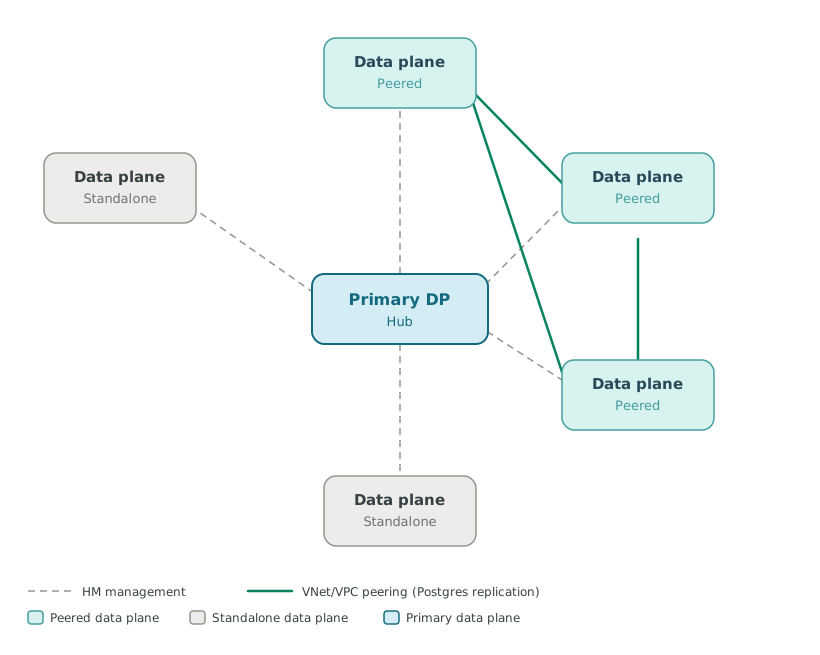
The Data Plane topology is optional mesh: any two Data Plane locations may be left entirely isolated, or they may be directly interconnected via VPC/VNet peering for Postgres-level replication. There's no hub, no mandatory center, and no required connectivity between locations.
When two Data Planes are peered, the network path enables direct Postgres replication between clusters hosted in each location. This is the foundation for two distributed Postgres topologies supported by EDB:
- EDB Postgres Distributed (PGD) — active/active multi-writer replication across locations, suitable for applications requiring zero RPO and near-zero RTO across regions. See the PGD documentation.
- CloudNativePG distributed — streaming replication across Kubernetes clusters and failure domains using CloudNativePG's distributed topology. See the CloudNativePG distributed documentation. Data Planes that aren't peered remain fully independent — separate security domains, separate failure domains, separate upgrade timelines. Peering is additive: it introduces a replication path without changing the isolation characteristics of either plane for any other purpose.
The optional nature of the mesh means the Data Plane topology is shaped entirely by the customer's replication and availability requirements, not by any architectural mandate from HM itself.
Relationship between the two topologies
The CP star and DP mesh are independent overlays on the same set of physical or cloud locations. A location can host a Secondary CP, a Data Plane, or both. The CP star governs what is deployed and how it is managed; the DP mesh governs how Postgres data moves between locations. Neither topology constrains the other.
| Control Plane | Data Plane | |
|---|---|---|
| Shape | Star — mandatory hub | Optional mesh — peer-to-peer |
| Hub required | Yes — Primary CP | No |
| Cross-node traffic | Control out, Logs in | Postgres replication (when peered) |
| Isolation model | Secondaries are independent engagement boundaries | Each DP is an independent failure and security domain |
| Network requirement | Private path to Primary required for all Secondaries | Private path only between peered DPs |
Choosing an installation scenario
HM provides a comprehensive suite of capabilities by default. To meet strict security standards and organizational governance, HM supports a modular installation through "scenarios". This allows you to deploy a curated subset of features, effectively reducing the software footprint for security audits and streamlining the UI by removing unauthorized or unlicensed components.
Note
Scenarios are intended for advanced production deployment planning. For pilots, proof of concepts (PoCs), and initial evaluations, we recommend a full installation to maintain maximum optionality and ensure all integrated capabilities are available for testing. Omitting the scenarios configuration parameter applies the operator's default set instead, and that set depends on your operator version: operator 2.1 installs the full set, while operator 2.2 or later installs only core. Rather than relying on it, list the scenarios you want explicitly so your configuration retains the same capabilities in later releases.
Available scenarios
The available scenarios are:
| Module | Description | Included capabilities |
|---|---|---|
core | Required. The foundational layer for all deployments. | Estate management, Observability, DBaaS provisioning, and system services (Cert-manager, Istio, etc.). |
migration | Enables schema and data migration tools. | Migration Portal integration, Data Migration Service (DMS), and other migration services. |
analytics | Large-scale data processing and cataloging. | Data Catalog. |
ai | Tools for building and serving generative AI. | Sovereign AI, model serving (kserve), Agent Studio, and GenAI builders. |
dbaas | Database clusters management. | Postgres cluster management, including provisioning, scaling, and updates. |
pgd | Distributed High Availability Database clusters management. | Distributed High Availability Postgres cluster management, including provisioning, scaling, and updates. |
marketplace | The app marketplace and the apps it deploys. | kapp-controller and the OSS Library apps, such as Apache Superset, Apache Airflow, Metabase, pgAdmin 4, pgBadger, and HammerDB. |
Note
From 2026.4.0 onwards, the dbaas, database cluster management capabilities are now controlled by a dedicated dbaas scenario, separated from the core scenario. Existing installations upgrading from 2026.3 must explicitly add dbaas to their scenarios list to retain Postgrescluster management functionality.
Note
From 2026.8 onwards, the app marketplace capabilities are controlled by a dedicated marketplace scenario, separated from the core scenario. If your scenarios list includes ai, marketplace is added for you as a dependency. Otherwise, existing installations upgrading from an earlier release must explicitly add marketplace to their scenarios list to retain the app marketplace. Add it once the operator is on 2.1 or later, and before you bump spec.version — earlier operator versions don't recognize marketplace and reject the change.
If you don't add marketplace to your scenario list, kapp-controller and any OSS Library apps you deployed are removed from your environment, along with the data those apps hold. For details, see Scenario changes on upgrade.
Note
From 2026.9 onwards, Distributed High Availability (DHA) cluster management is controlled by a dedicated pgd scenario, separated from the dbaas scenario. No other scenario adds pgd automatically, so existing installations upgrading from an earlier release must explicitly add pgd to their scenarios list to retain their DHA clusters. Add it once the operator is on 2.2 or later, and before you bump spec.version. Earlier operator versions don't recognize pgd and reject the change.
If you don't add pgd to your scenario list, Distributed High Availability clusters you deployed are removed from your environment, along with the data those clusters hold. For details, see Scenario changes on upgrade.
Important
Add pgd to every location that hosts, or will host, DHA clusters — including secondary locations. If you don't add pgd to a location's scenario list, its existing DHA clusters will be deleted (and new ones will not be allowed to be created).
Planning your selection
When choosing which scenarios to install, consider the following architectural and operational factors:
Functional footprint: While the baseline resource usage is similar across scenarios, each scenario introduces specific services and endpoints. Limiting your installation to required scenarios simplifies security audits and reduces the "attack surface" of your production environment.
UI and feature governance: The HM console dynamically hides navigation links and tools (such as GenAI Builder or Data Catalog) for disabled scenarios. This ensures users only interact with authorized and licensed capabilities.
Default behavior: If the scenarios parameter is omitted, the operator applies a default set, and that set depends on your operator version. Operator 2.1 installs core, dbaas, ai, analytics, migration, and marketplace. Operator 2.2 or later — which 2026.9 requires — installs only core, so the set of scenarios is always an explicit choice. List the scenarios you want explicitly.
Scenario dependencies:
- The
aiscenario depends onmarketplace. If you selectai,marketplaceis installed with it, whether or not you list it explicitly. - The
pgdscenario depends ondbaas. If you selectpgd,dbaasis installed with it, whether or not you list it explicitly.
Decide whether your environment requires a full installation or a targeted subset.
Important
Currently, modifying installation scenarios after deployment isn't supported. Ensure you install all required capabilities, as you can't add or remove them once HM is deployed.
Impact on configuration
The decisions made during this discovery process directly determine the some of the root parameters of your installation configuration.
While you do not need to create the file yet, your Architecture Decision Record should specify the values for these keys. The SRE/Admin builds on these inputs, by either recording them or beginning/continuing the configuration file in Phase 2: Gathering your system requirements and/or uses these values to build the configuration file in Phase 4: Preparing your environment.
Values needed for the configuration
The information and field values you gather in Phases 1–2 are recorded in a HybridControlPlane Custom Resource manifest, used with the edb-hcp-operator helm chart.
Configuration details
| Architecture decision | HybridControlPlane CR field | Example value |
|---|---|---|
| Kubernetes Platform | spec.flavour | aks, eks, gke, rhos |
| Target location | spec.componentsParameters.upm-beacon.beacon_location_id | aws-us-east-1 |
| Provisioning mode | spec.beaconAgent.provisioning.provider | azure, aws, or gcp |
| Installation scenarios | spec.scenarios (YAML list) | core, migration, ai, analytics, dbaas, pgd, marketplace |
Impact on configuration file
The following YAML snippet shows how your architectural decisions above map to the final HybridControlPlane CR structure.
apiVersion: edbpgai.edb.com/v1alpha1
kind: HybridControlPlane
metadata:
  name: edbpgai
spec:
  flavour: <Kubernetes_Flavor> # for example, rhos, rke2, aks, eks, gke
  version: <Version>
  registry:
    url: <Container_Registry_Domain>/pgai-platform
  scenarios: # list scenarios explicitly rather than relying on the operator default
    - core
    - migration   # remove if not needed
    - ai          # remove if not needed
    - analytics   # remove if not needed
    - dbaas       # remove if not needed
    - pgd         # required for Distributed High Availability (DHA) clusters
    - marketplace # remove if not needed
  componentsParameters:
    upm-beacon:
      beacon_location_id: <Deployment_Location_Name>
  beaconAgent:
    provisioning:
      provider: <Provider_Name> # Azure, AWS, GCP
      openshift: <Boolean_Value> # Defaults to false, set to true if deploying on RHOS
Next phase
Your architecture is defined and ideally recorded in an ADR for reference.
Proceed to Phase 2: Gathering your system requirements → to verify that your infrastructure can match your design in your ADR.